Fund Operations
The fourth product. An optional double-entry ledger per vehicle: import a bank feed, book capital calls and distributions, close a period, and produce capital account statements and financials.
Accounting gives each of your vehicles a real double-entry ledger and turns it into the numbers your LPs actually see. It is entirely optional: turn it on for one vehicle, or none, and the rest of the platform works exactly as it did.
Onboarding a vehicle
Accounting gives each of your vehicles (a fund, an SPV, a direct deal, a GP entity) a real double-entry ledger. Onboarding a vehicle means seeding the chart of accounts, then choosing how the books start. Full history rebuilds the ledger from inception out of your existing portfolio and LP data. Cutover starts at a date with opening balances. GP and associate entities get their own chart (investment in fund, members' capital, carried interest income) because they keep different books.
Bank transactions
Paste or upload a CSV export from your bank, Ramp, or QuickBooks. Columns are matched automatically, rows de-duplicated, and each becomes a balanced draft entry. AI suggests the account and entry type for a whole batch at once. An inflow can be booked as a capital call (funding one LP's open call, or split across every LP pro-rata by commitment), and an outflow as a distribution, split by capital balance so it lands in each partner's capital account rather than a pooled one. Nothing posts itself; every entry waits as a draft for you.
Journal
Every entry in plain double-entry form. Create, edit, post, unpost, void. A posted entry is never silently deleted, and an entry inside a closed period cannot be changed at all until the period is reopened. This is enforced in the database, not just in the app.
Capital accounts
A per-partner roll-forward: beginning capital, contributions, distributions, management fees, expenses, income, realized and unrealized gains, FX translation, carried interest, ending capital. All of it derived from the ledger, so it always ties. Issue capital calls, track called, funded and unfunded per LP, and publish per-partner capital account statements as PDFs straight to the LP portal.
LP capital events
Not every vehicle needs full books. An SPV, a direct investment, or a fund whose administrator sends you a statement can instead record LP capital movements directly, by hand or by pasting a spreadsheet. Those vehicles produce the same capital accounts, the same statements, and the same LP report as a fully-booked one, and can be promoted to a full ledger later.
Allocation terms
How the close splits each category across partners: the allocation basis, each partner's commitment over time (effective-dated, including transfers between LPs), and who bears which category (a GP entity that pays no management fee, a side letter with a negotiated rate). Carry terms are set per vehicle: none, a straight split, or a European waterfall with a preferred return and catch-up.
Period close
The single place allocation happens. Close through a date; the span splits into calendar months, and each is allocated and locked in turn, so gaps are impossible. The close allocates income and expenses to each partner's capital account, accrues interest on convertible notes, and accrues carried interest on unrealized gains, as if the fund liquidated at that period's NAV. That last part is what keeps every LP's reported NAV net of what the GP would actually take; without it, an LP's statement overstates what they would receive. Reopening a period reverses its allocation exactly, voiding rather than deleting.
Schedule of investments
Each position at cost and fair value, with its unrealized gain and its share of net assets, broken out by country, industry, and asset type. Rows come from your portfolio tracker and the ledger is the control total. Any variance between the two is surfaced, never hidden.
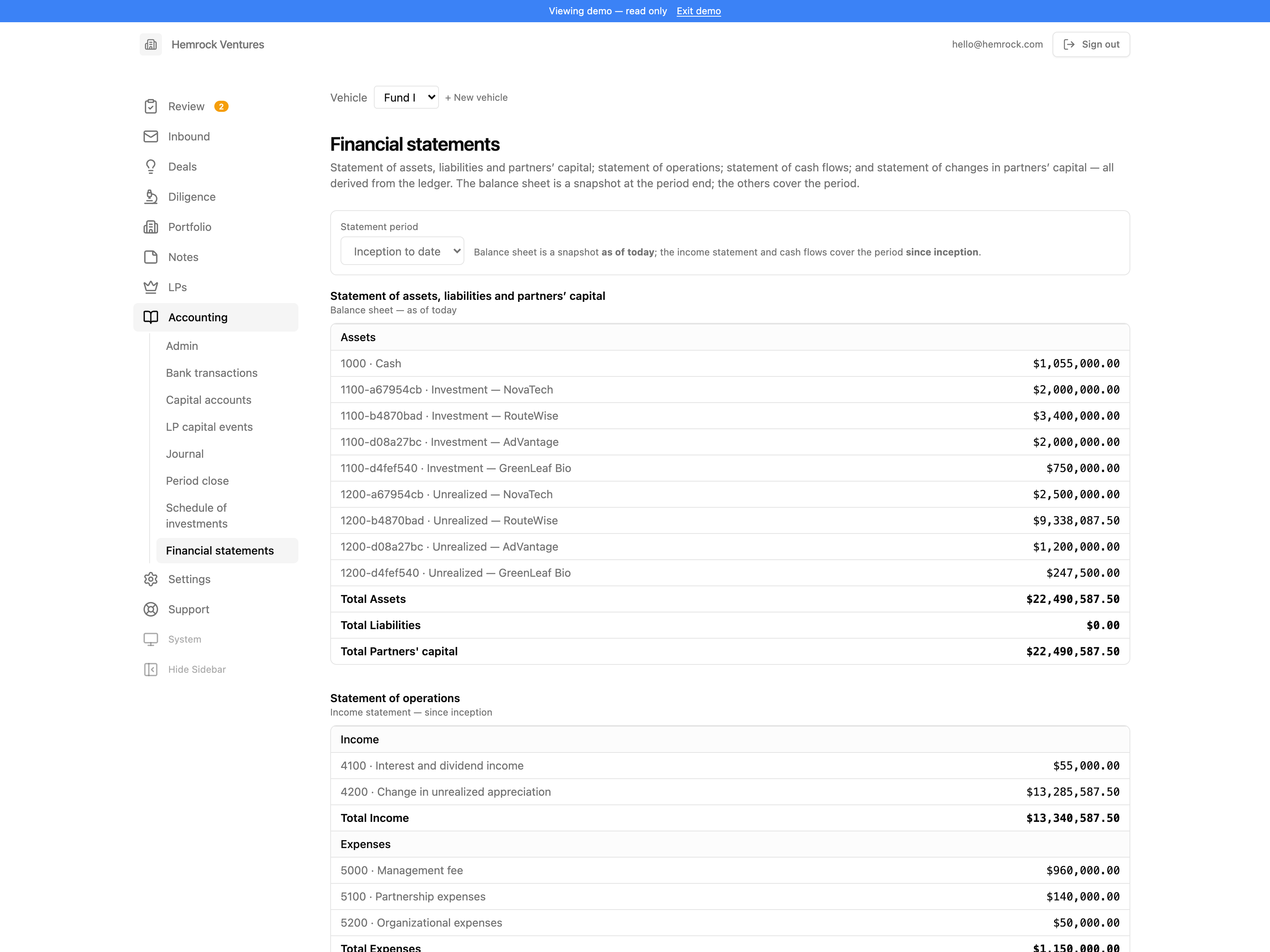
Financial statements
Balance sheet (statement of assets, liabilities and partners' capital), income statement, statement of cash flows, and statement of changes in partners' capital. Books that don't balance are reported as a blocker, not buried.
Live capital report
The LP report, derived from the books as of any date rather than frozen at import time, across every vehicle. A member who invests through your GP or associate entity is looked through to their share of what that entity holds: capital follows their ownership, carried interest follows their carry points, and the two are allowed to differ (a partner can hold carry points and no commitment at all). You can compare a live report against any stored snapshot, line by line, to see exactly where the two disagree.
AI assistant
An assistant scoped to your books: interpret a statement, reconcile an account, draft an entry. It proposes; it never posts. Everything it produces lands as a draft for you to review. An API-key-authenticated agent endpoint (REST and MCP) is available if you want an external agent to work against your books.
Compliance calendar
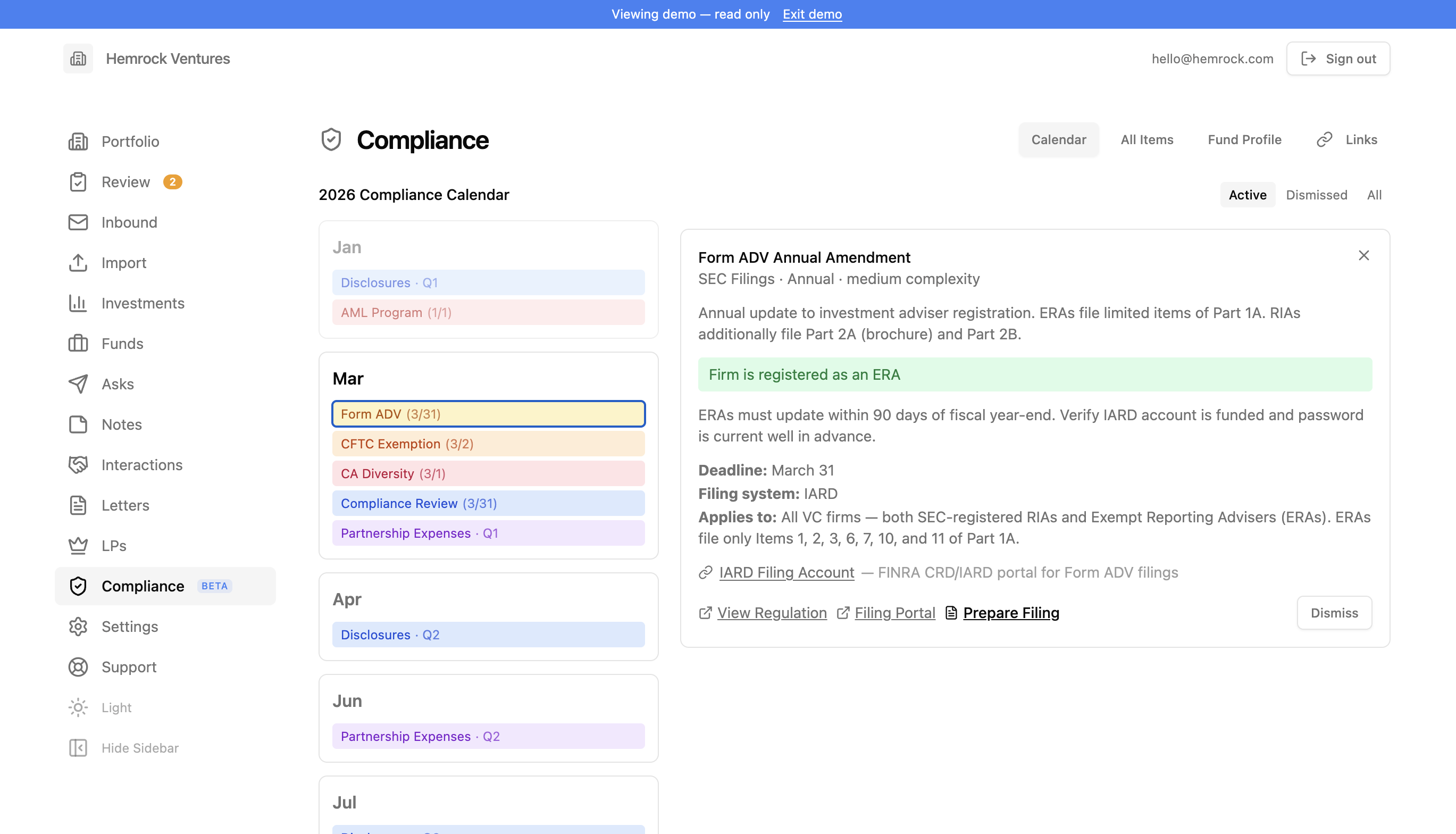
Compliance helps venture capital fund managers stay on top of regulatory filings, tax deadlines, internal compliance requirements, and fund reporting obligations. It provides a calendar-based view of everything due throughout the year, tailored to your fund's specific profile.
Compliance profile. Answer a short questionnaire about your fund (registration status, AUM range, fund structure, Reg D exemption, state presence, and so on) and the system automatically determines which compliance items apply to your fund, which need further review, and which you can safely dismiss.
Calendar view. All applicable compliance items are displayed in a monthly calendar organized by deadline. Items are color-coded by category: SEC filings in amber, tax filings in green, internal compliance in blue, fund reporting in purple, state compliance in rose, CFTC in orange, and AML/FinCEN in red. Quarterly items like partnership expense reviews and access person disclosures appear in each quarter independently, so you can track and dismiss them separately.
Event-driven items. Filings like Form D and Blue Sky that are triggered by fund closes appear only in the months where your fund has committed capital entries, rather than cluttering every month. This is derived automatically from your fund cash flows data.
Dismiss and filter. Mark items as done for the year (or quarter) by dismissing them. Filter the view between active items, dismissed items, or all items to see what's been completed and what remains.
All items view. A comprehensive list of every compliance item organized by category (SEC Filings, Tax Filings, Internal Compliance, Fund Reporting, Securities Offerings, State Compliance, CFTC, and AML/FinCEN). Each item shows its frequency, deadline, applicability, filing system, and any relevant notes or alerts. Click any item to see full details including regulation links, filing portal links, and your saved reference links.
Links and accounts. Save links to filing portals, regulatory accounts, and reference documents. Each link can optionally be associated with a specific compliance item, and associated links appear on that item's detail card for quick access.
Built-in compliance registry. The system ships with a curated registry of compliance items covering SEC filings (Form ADV, Form PF, Form 13F, Schedule 13G, Form 13H, Form N-PX), securities offerings (Form D, Blue Sky), CFTC exemptions, California diversity reporting, tax filings (Form 1065, K-1s, Form 7004), internal compliance (access person disclosures, annual compliance review, privacy notice), AML/FinCEN requirements, fund reporting (quarterly financials, valuations), and partnership expense allocation. Each item includes detailed descriptions, deadline information, applicability criteria, and links to relevant regulations and filing portals.