“I love this Cap Table - Structured and easy to understand.”

Anonymous
Build a cap table through multiple rounds of equity, SAFEs, and convertible notes, then see who gets paid at exit, in your browser or in Excel and Google Sheets.
4.9(370)33,288 downloads
Included with the model
Getting the model gets you both builders on the web and the spreadsheet for Excel and Google Sheets. They run the same math, so the numbers match wherever you work. Save your cap tables and waterfalls to your account, share a read-only link, and export to Excel when you want the formulas.
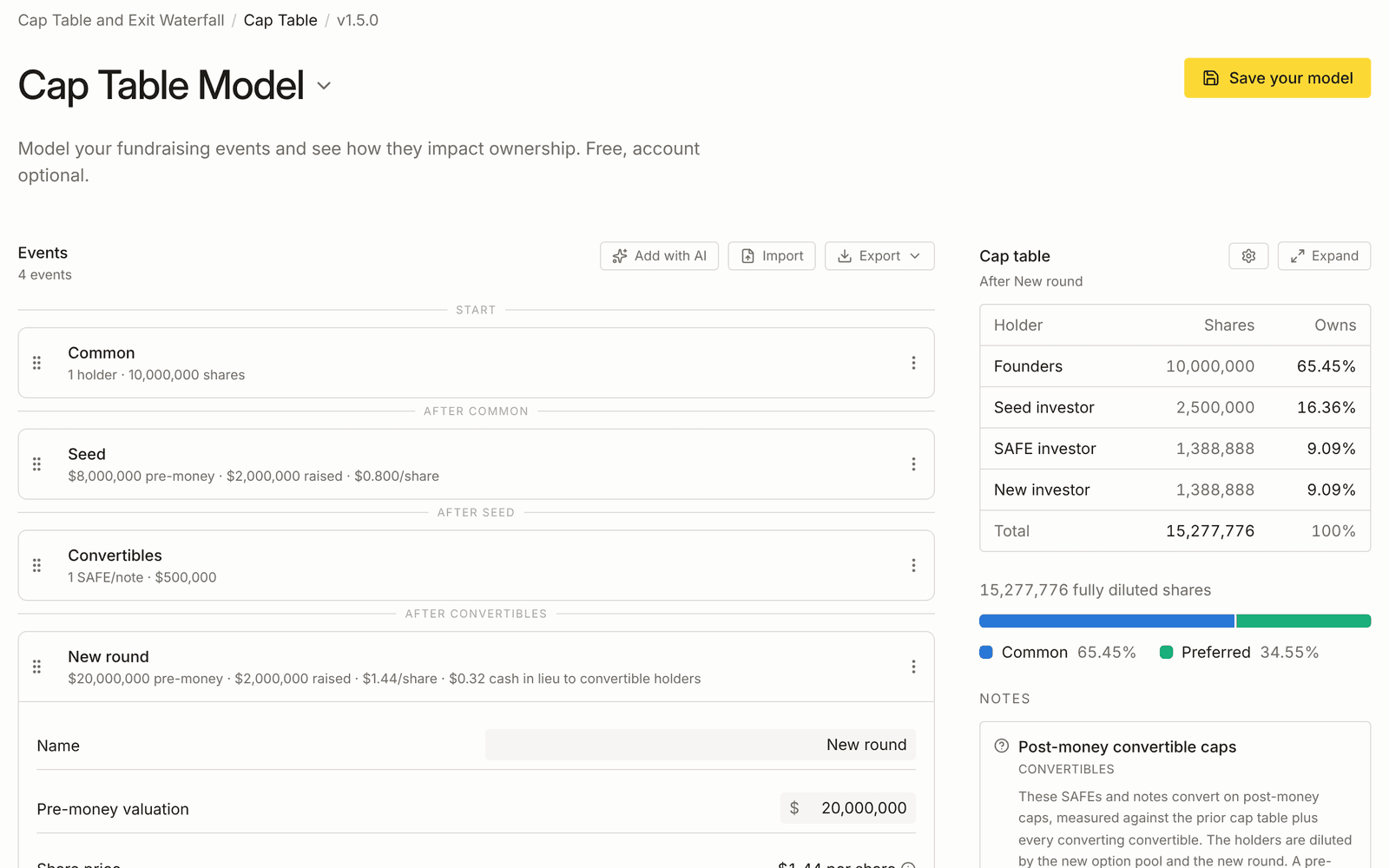
Add rounds one after another and watch ownership, price per share and the fully diluted count move as you type.
No account needed to try it.
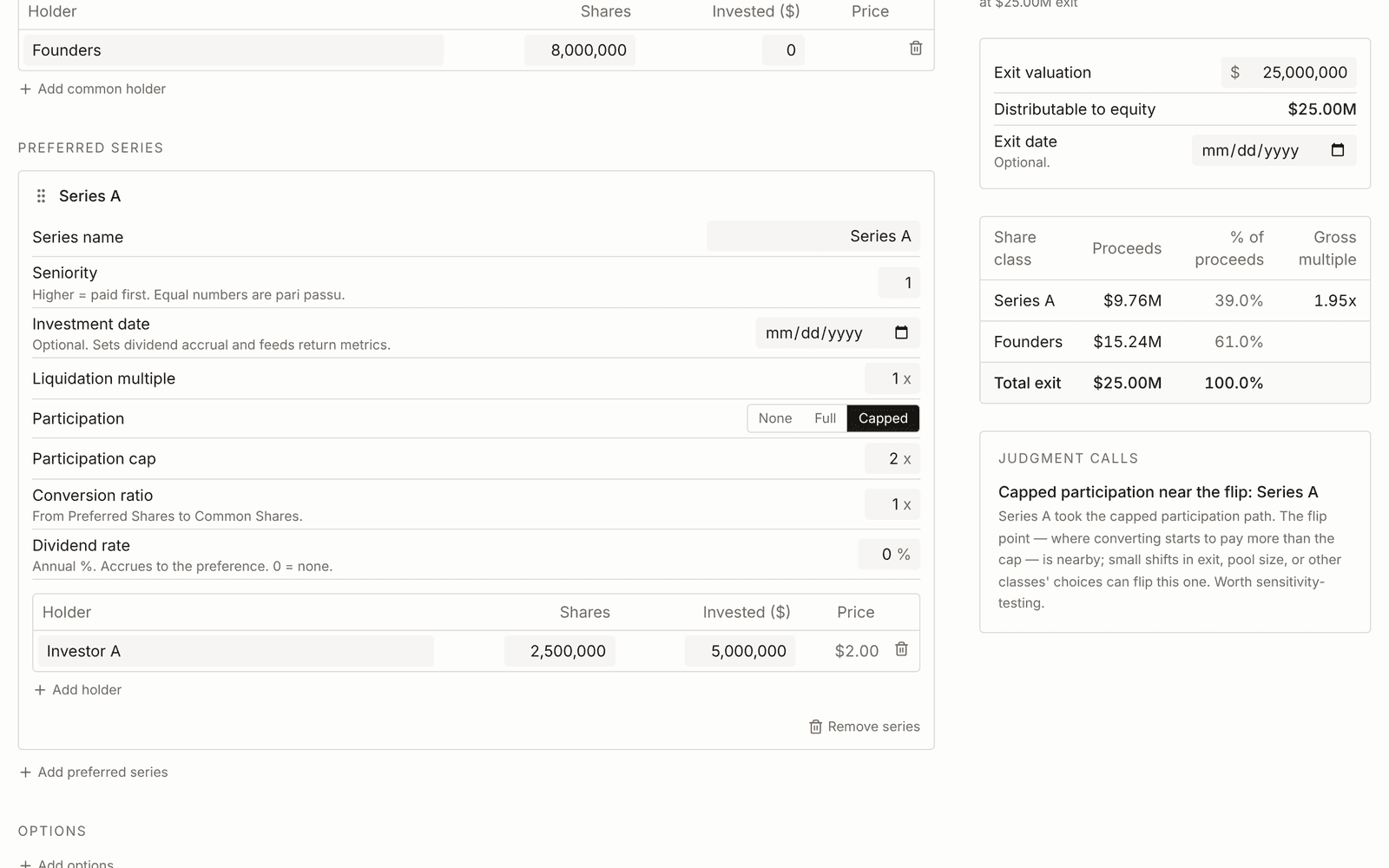
Set up the share classes and an exit value, and see what each holder takes home at that price and across a range of prices.
No account needed to try it.
“Great model that includes all the bells and whistles you may need in a complex waterfall. Taylor was extremely responsive and helpful when it came to answer my questions. Thank you so much!!”

$20 suggested, but "0" is ok. All donations appreciated.
Web builders, Excel and Google Sheets
Hemrock’s financial models are available to everyone. All donations are appreciated to support their continue development and support.
This model is open source under the Apache License 2.0. You can use it, modify it, redistribute it, and incorporate it into commercial work subject to the license. Apache 2.0 license
Build cap tables, multi-round proformas, SAFE and convertible note conversions, option pool issuance and refreshes, anti-dilution scenarios. Run exit waterfalls, liquidation preferences, participation rights, dividends, option and warrant exercise, multi-class share structures.
Built for two jobs at once. As a scenario-modeling tool, founders test how a round changes ownership, investors model a portfolio company's exit, and lawyers walk a client through term sheet implications. As an instructional tool, it teaches the mechanics: every formula is visible and every step documented, for anyone learning cap tables or teaching them.
In your browser. The cap table builder takes you round by round, and the waterfall builder runs the payout at any exit value. Both save to your account, share as a read-only link, and export to Excel.
As a spreadsheet. The workbook for Excel and Google Sheets, with every formula open and a worked example sheet for each mechanic. It's the one to teach from, or to hand a lawyer who wants to check the math.
From your AI or your code. The same engines answer the API and the MCP server (details below), so an agent's numbers match the builders'.
Every cell open. Inputs in blue, formulas in black. Built to be customized for your specific situation.
Multiple example sheets, each set up for a different scenario:
Updated February 2025: the exit waterfall is now easier to extend for different share-class structures.
The cap table and exit waterfall are also an engine you can call directly, the same one behind the spreadsheet and the web tool, so a number computed by an agent matches the one in your model.
An API for agents. Cap Table & Exit Waterfall compute costs $20/year and includes 6,000 successful calculations shared between both engines. Sign in to the developer dashboard, buy the annual product, and create a key. A payment-required response directs you to account setup; compute credentials cannot purchase products or create other credentials. How the API works covers authentication, counting, limits, and retries; the API reference has the schemas.
MCP for your AI. Connect the Hemrock MCP server and Claude, ChatGPT, or any MCP client runs these calculations from a conversation, next to the context tools that teach it how the math actually works. Your AI handles the judgment; the engine handles the arithmetic that has to be exact. That split is the point: an LLM doing cap table math in its head miscounts an option pool or converts a SAFE on the wrong basis, and the engine removes that failure mode.
API and MCP share the same account-level allowance. A cap-table call followed by a waterfall call uses two calculations. Fund Economics is a separate $20/year compute product with its own 6,000 calculations. Unused calculations do not roll over, and there are no automatic overage charges. Buying the spreadsheet does not grant perpetual hosted compute. See MCP and API.
Why use this when AI can build a cap table for me?
A cap table is exactly where AI tends to go quietly wrong. A miscounted option pool or a SAFE that converts on the wrong basis looks fine until it costs someone real ownership. This model hands AI a structure with the conversion math already correct, so it edits inside guardrails instead of inventing them.
My term sheet is unusual. Will it handle it?
Most of them, yes. Participating and non-participating preferred, seniority and pari-passu stacks, multiple liquidation preferences, full-ratchet and weighted-average anti-dilution, SAFEs and notes are all prebuilt. Every cell is open, so an unusual clause is an edit, not a dealbreaker.
Is this a cap table tracker?
No. Use a platform like Carta, Mantle, Cake, or Ledgy for tracking. Use this for modeling, scenarios, and learning.
Is the web builder a different product?
No. Getting the model gets you the cap table builder, the waterfall builder and the spreadsheet together. You can try either builder before you get it, with no account. Getting it is what saves your models, shares them and exports them to Excel.
Excel or Google Sheets?
Both. All formulas open.
Pay what you want?
Yes. Set the price you think is fair.
Do you teach this?
Yes, free guided learning in the docs and live workshops when scheduled.
Guided walkthroughs of equity rounds, convertibles, options, anti-dilution, and exit waterfalls, free, in the docs. Or attend a live workshop.
“I love this Cap Table - Structured and easy to understand.”
“very detailed and well put, FYI there are even more resources in SAFES, convertibles , Anti - Dil etc”
“Best exit waterfall model I've ever seen. Incredible work.”
“Taylor Davidson went out of his way to help me. I was not expecting that. Thank you”
“Very useful and easy to use!”
The downloadable model is licensed under the Apache License 2.0. Hemrock trademarks and other brand assets are not included in that license. Financial models are provided as-is for informational and analytical purposes. They may contain assumptions, simplifications, errors, or omissions and are not legal, tax, accounting, investment, or other professional advice. You are responsible for reviewing the model and determining whether it is appropriate for your circumstances. See the Apache License 2.0 and the Hemrock terms for complete terms.
$20 suggested, but "0" is ok. All donations appreciated.
Web builders, Excel and Google Sheets