SendK1s
Auto-redact SSNs, encrypt PDFs, and send K-1s securely from Gmail without exposing investor data.
Self-hosted · Open source, Apache 2.0
What you'll do with it
Take the folder of K-1 PDFs your tax preparer sent you, redact the SSNs, encrypt each file, and send every LP their own one. It runs on your machine and it's free.
Built for the tax-season ritual nobody enjoys: matching a pile of PDFs to a list of LPs, attaching them one at a time, and then fielding "did you send mine?" for the next three weeks. If your fund administrator already distributes K-1s, they should keep doing it and you don't need this. This is for self-administered funds and SPVs, and for anyone running several vehicles whose preparer hands over a folder and stops there.
Nothing leaves your machine
A K-1 carries a Social Security or taxpayer ID number. Most tools built for this are portals, so distributing K-1s means uploading a few hundred of those to somebody else's servers and asking your LPs to log in.
This works the other way around. Redaction and encryption happen locally, the web interface runs on localhost, and the files go out through your own Gmail or SendGrid account. No portal, no vendor holding tax documents, no account for your LPs to create. Whether that matters is a judgment call about your own risk posture, and I'd rather you make it deliberately than inherit it from a vendor.
How it works
Four steps, in this order.
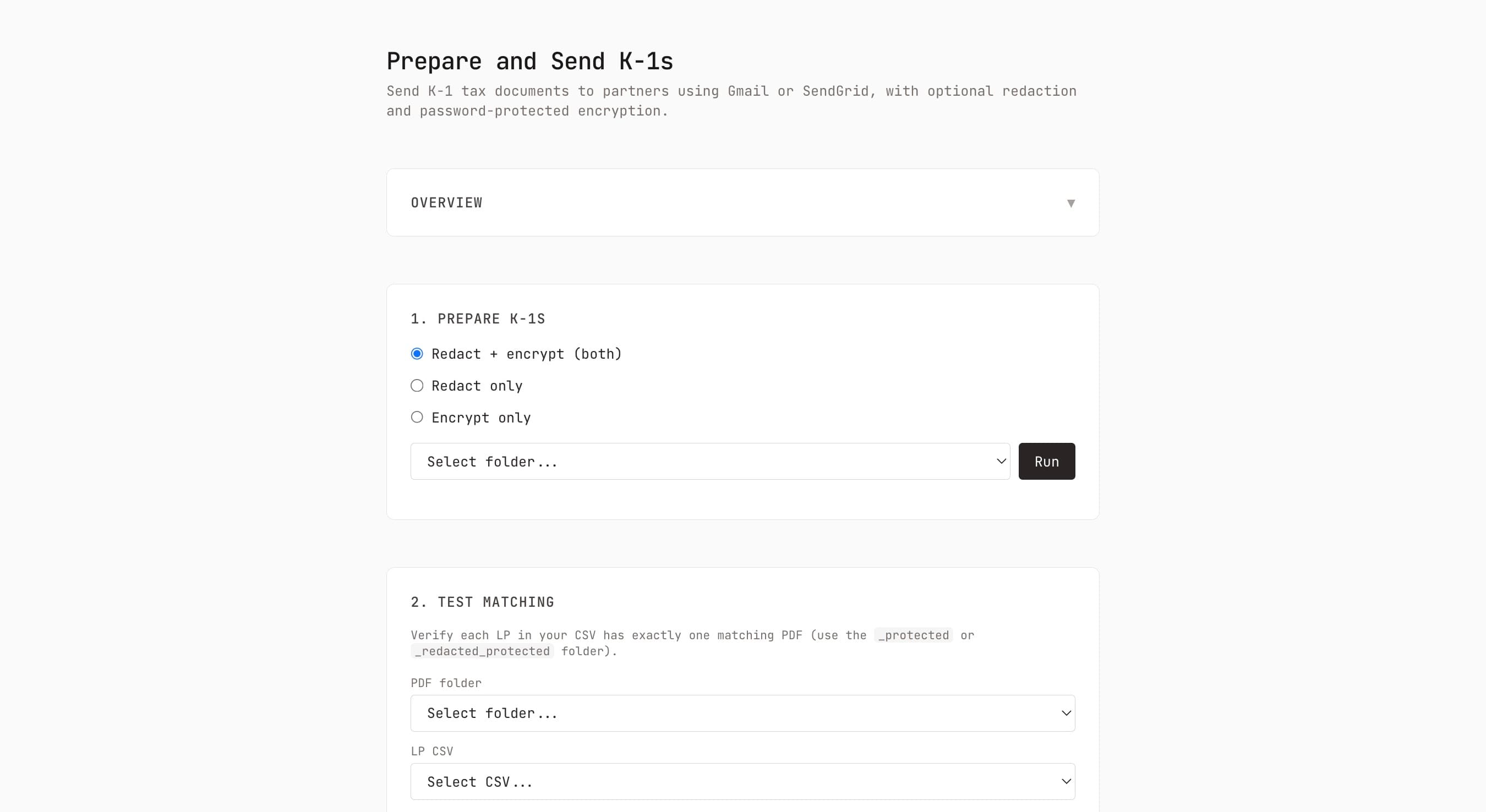
- Prepare. Point it at the folder. It covers the recipient's SSN or TIN with a white box and prints the masked form on top (
***-**-7876), then encrypts each PDF. Redaction runs before encryption. You can run either half on its own. - Test the matching. Each LP in your CSV needs exactly one matching PDF, matched on part of the filename. This step tells you before you send, which is the point: a mismatch here means the wrong LP opens somebody else's tax document.
- Test send. One K-1 to an address you control, so you see what an LP sees.
- Send. Through Gmail with OAuth, or SendGrid with an API key. One LP can have several email addresses.
The passwords are the part I'd point at. Each file is encrypted with a password derived from the last four digits of the recipient's SSN or TIN plus their ZIP code, so there's nothing to distribute and nothing for an LP to lose. They already know both. You never email a password alongside the document it protects, which is the failure mode this design is built to avoid.
What you need
Node and PDFtk (qpdf works too, with one environment variable). A CSV of your LPs with an identifier and an email address. Gmail credentials from the Google Cloud Console, or a SendGrid API key.
Open source under the Apache License 2.0. Use it, change it, run it for as many funds as you like.
Common questions
Do I need this if I have a fund administrator?
Probably not. AngelList, Sydecar, Carta, and Juniper Square all deliver K-1s as part of what you already pay them. If your administrator is handing you a folder of PDFs and asking you to distribute them, that's worth a conversation with them before it's worth a tool.
How do LPs open an encrypted K-1?
With the last four digits of their SSN or TIN and their ZIP code. Nothing to send, nothing to lose, and no password travelling in the same channel as the document.
What does it redact?
The receiving party's SSN or TIN, when the preparer left it unredacted. The number is covered and the masked version printed over it, so the document still reads correctly.
Can I skip redaction or encryption?
Yes, either one. Some preparers already redact, in which case run encryption alone.
How are PDFs matched to LPs?
By filename. Each LP row carries an identifier that has to appear in their PDF's filename, and the test step confirms every LP has exactly one match before anything sends.
Gmail or SendGrid?
Gmail is simpler to set up and fine for a few hundred LPs. SendGrid handles larger sends and avoids Gmail's sending limits. Authenticate your domain in SendGrid or your mail lands with a spoof warning.
Is it really free?
Yes. Apache 2.0 on GitHub, including commercial and multi-client use. If you want help running it for your fund, get in touch.
Documentation
Reviews
No reviews yet. Used this product? Sign in to leave a review.
Self-hosted · Open source, Apache 2.0